For years, organizations with Windows environments have grappled with two interconnected security headaches: static credentials that never get rotated and network access that is far too broad. Despite modern authentication advances like MFA, many teams still rely on shared local administrator accounts, long-lived domain accounts, and manual password provisioning. Meanwhile, traditional VPNs grant network-level entry but fail to control lateral movement once inside. This article explores how HashiCorp Boundary and Vault work together to solve both problems—replacing static passwords with dynamic, just-in-time credentials and enforcing access based on user identity rather than IP address. Below, we answer common questions about this approach.
Why are static credentials still so common in Windows environments?
Despite widespread awareness of security risks, many organizations continue to rely on static passwords for Windows systems. Shared local administrator accounts are frequently used for RDP sessions, remote troubleshooting, and emergency break-glass scenarios. Long-lived domain accounts and service accounts with manually set passwords can remain unchanged for months—even years. The primary reason is lack of automation: rotating credentials manually is tedious and prone to disruption, so teams postpone it indefinitely. Furthermore, while multi-factor authentication (MFA) improves login security, it doesn't eliminate the underlying problem of static credential reuse. When the same password is used across multiple sessions or machines, a single breach can expose an entire environment. This is particularly dangerous in organizations where privileged access is shared among IT staff, as credential leakage often goes unnoticed until it's too late.
What's wrong with using a VPN for remote Windows access?
Traditional VPNs follow a castle-and-moat paradigm: secure the perimeter, then trust anything inside. Once a user connects, the VPN grants broad network access based on IP addresses rather than individual identity. In dynamic cloud environments, IP addresses change frequently, making firewall rules brittle and hard to maintain. Even with network segmentation, controlling lateral movement at the user-to-resource level remains nearly impossible. A compromised account can move freely across servers and workstations because the VPN doesn't distinguish between a legitimate admin and an attacker after the initial connection. Additionally, deploying separate tools for access control and credential rotation leads to operational sprawl. The result: organizations gain connectivity but lose granular security. For Windows environments, this often means every RDP target is reachable by every authenticated user—a recipe for disaster.
How does Boundary change the access model for Windows machines?
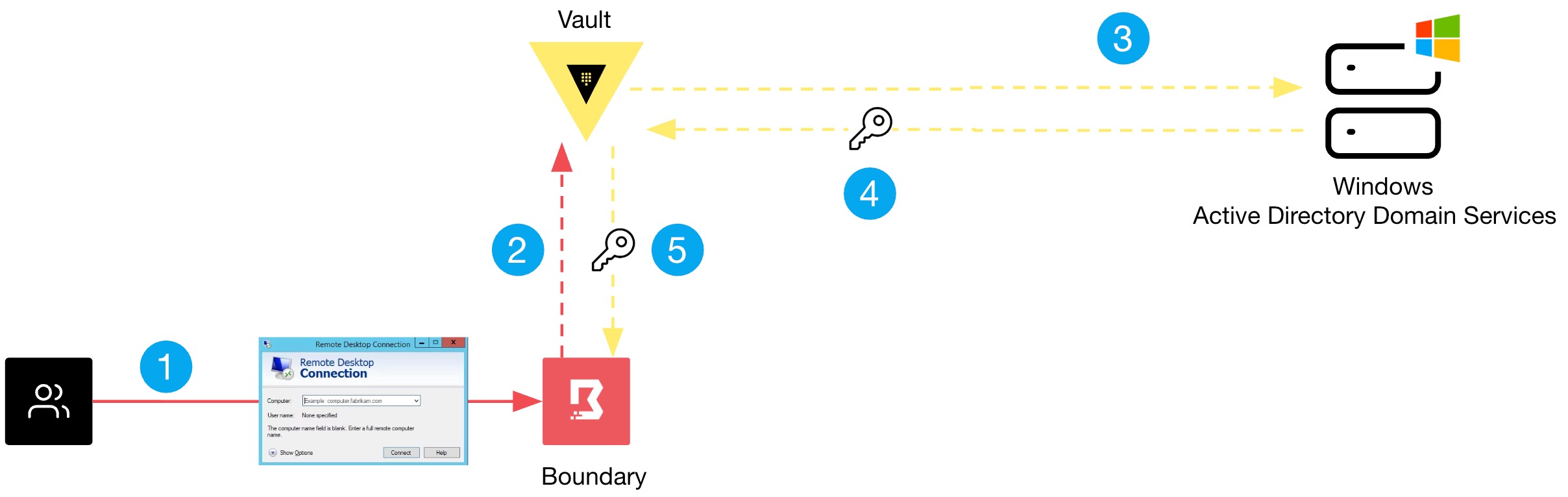
Boundary flips the traditional model by combining authentication and authorization onto a single platform. Instead of granting broad network access, it brokers a direct, identity-based session between a user and a specific target—whether that's a Windows server via RDP or an SSH host. Access is granted based on who the user is, not where they are connecting from. Boundary integrates with your existing identity providers (e.g., Active Directory, LDAP, OIDC) to enforce MFA and role-based policies. Once authorized, Boundary establishes a secure tunnel to the exact resource, but only for the duration of the session. This eliminates the need for static credentials: Boundary can dynamically inject secrets from Vault, so the user never sees the password. For Windows administrators, this means no more shared admin accounts floating around—each session gets a unique, rotated credential.
What role does Vault play in managing credentials alongside Boundary?
Vault acts as the secrets management backbone in this architecture. While Boundary handles access control and session brokering, Vault is responsible for generating, storing, and rotating credentials for Windows targets. For example, Vault can dynamically create local admin accounts on a Windows server, set a password, and then revoke that account after the session ends. Boundary retrieves these credentials on the user's behalf and injects them into the RDP session—without the user ever knowing the password. Vault also supports Active Directory integrations to manage domain accounts, rotating passwords on a schedule or after each use. This pairing ensures that even if a session is intercepted, the credential is immediately invalid. Together, Boundary and Vault provide end-to-end protection: identity-based access control and ephemeral secrets that drastically reduce the attack surface.
Can Boundary work with existing Active Directory or MFA setups?
Absolutely. Boundary is designed to integrate with existing identity infrastructure. It supports LDAP and Active Directory for authentication, allowing you to reuse your current user directory. For MFA, you can chain any OIDC provider (like Okta, Azure AD, or Ping) that supports MFA. This means you don't need to rip and replace your current IAM stack. Boundary evaluates a user's group memberships and policies to determine which Windows resources they can access. For instance, only members of the "Windows Admins" group can initiate an RDP session to a given server. Because authorization is dynamic, you can layer additional checks—such as time-based or approval-based access—without changing network topology. This flexibility makes it practical to adopt Boundary even in large, heterogeneous Windows environments.
What steps are needed to test Boundary and Vault in a Windows environment?
To test this solution, start by deploying Boundary and Vault—either on-premises or in the cloud. Next, configure Vault with a secrets engine for Windows, such as the Active Directory engine or a custom one for local accounts. Set up a role that defines how and when credentials are generated. Then, configure Boundary with a target representing your Windows machine. Point the target to use Vault's credential store. After that, create a user in your identity provider (e.g., LDAP) and assign them a role in Boundary that grants access to that target. Finally, initiate a session via Boundary's browser-based UI or CLI. Boundary will authenticate the user, request a temporary credential from Vault, and launch an RDP connection without the user ever handling the password. For a full walkthrough, refer to HashiCorp's official documentation—the architecture is straightforward but requires careful planning around network rules and Vault policies.
How do Boundary and Vault reduce the risk of credential exposure?
The combination eliminates the two biggest vectors: static credentials and broad network access. First, Vault ensures that every Windows session uses a unique, short-lived credential. Even if an attacker captures a session, the password is already expired. Manual rotation burdens disappear—Vault automates it. Second, Boundary replaces the VPN's all-or-nothing access with identity-based, per-resource sessions. Users can only reach the specific machines they are authorized to see, and only when authenticated. Lateral movement is blocked because there's no network-level entry point. Additionally, session recording and auditing become simpler: every RDP connection is logged with the user's identity, target, and duration. For CISO and security teams, this means measurable reduction in credential sprawl, compliance with password rotation policies, and a clear audit trail. It's a fundamental shift from perimeter security to zero-trust access.